 Better Calendar Widget
Better Calendar Widget
Better Calendar Widget
Finally, a macOS calendar widget that lets you change the months.
Get it nowRequires macOS 14.0 or later
Okay, not really. We just added arrows so you can switch the months in the widget without having to open the full calendar.
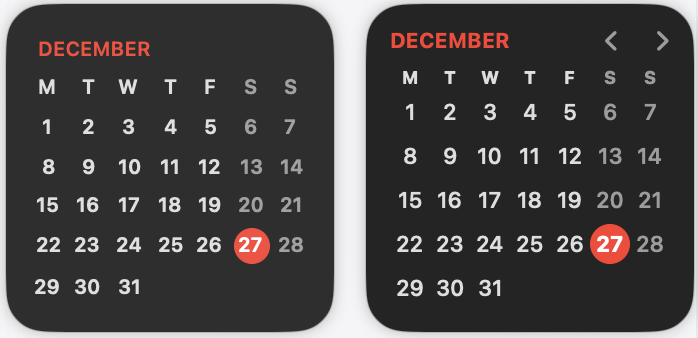
Swiftly move forward and backward in time. Click the month name to instantly jump back to today.
Click any date to instantly jump to that specific day in your macOS Calendar.
No dock icon. No persistent window. A purely background utility that lives only when you need it.
No account, no credit card, no annoying popups. Use our widget for a full year, and if you find the convenience is worth it, a one-time $10 payment keeps the widget yours forever.
We believe in the ancient, mystical
tradition of "Buying something once and owning it."
No subscriptions. No recurring fees. No
monsters.
Relax. We use the macOS Keychain to securely store your trial info. It's the most secure way to keep things tied to your Mac. We don't even know what your WiFi password is, let alone your secrets.
Never. We're a bold, experimental startup trying out a business model from 1995: you pay once, and you own the app. Forever.
Zero tracking. We don't have a database. We don't know who you are. Honestly, we barely know what day it is — that's literally why we built this.
If they do, we'll take it as a compliment. Navigating a calendar is 21st-century tech — we're just giving them a head start on the R&D of... buttons.
Our support team (one guy and an AI) is here for you. Reach out: Reveal Email
Native widget on the left, Better widget on the right.